

1. What is Research Desk?
Reliable, Repeatable Data Collection Research Desk is Rep Data’s industry-leading quantitative research sample platform. It empowers buyers to collect high-quality data at a fair price by bringing together respondent targeting, fraud prevention, fieldwork management, and reconciliation in one streamlined interface. Why integrate as a supplier?- Receive dedicated sample allocations programmatically, without manual coordination
- Read live qualifications and quotas so you only send respondents that fit open targets
- Automate entry-link generation and respondent redirects
- Automate reconciliation so low-quality records are processed quickly and accurately
2. What is the Supply API?
The Research Desk Supply API lets sample suppliers integrate directly with Research Desk for programmatic sample order placement and fulfillment. Your platform can retrieve the surveys and streams allocated to you, read their targeting criteria and quotas, generate respondent links, and receive reconciliations — all without working inside the Research Desk interface. The API is a RESTful service, which means it follows widely adopted conventions that make it straightforward for any modern engineering team to work with. It uses standard HTTP methods and returns JSON-formatted data.3. Core Concepts: Surveys & Streams
Surveys and Streams are two of the key objects represented in the Supply API.
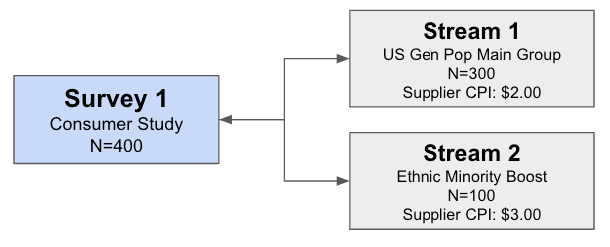
A Survey has a 1:many relationship with Streams; a Stream always has a 1:1 relationship with its Survey. Simple sample requirements may use a single Stream, while more complex requirements frequently use multiple Streams.
In the diagram below, a Survey called “Consumer Study” requires 400 completes overall. The sample buyer created two Streams to match the Survey’s requirements: Stream 1 covers US “Gen Pop” sub-quotas (age, gender, ethnicity, household income) for 300 completes at a 3.00 CPI.
4. High-Level Integration Flow
A typical Supply API integration follows this lifecycle. The API Workflow guide walks through each step with example calls.1
Get your credentials
Request an API key from Rep Data’s Supply team. The key is passed in the
Authorization header of every request.Go to: Authentication & Access2
Retrieve your allocations
Call the Surveys endpoint to retrieve the Surveys and Streams allocated to you, along with their status, country, language, LOI, IR, and CPI.Go to: List Surveys & Streams
3
Read qualifications & quotas
For each Stream, retrieve its qualifications (respondent eligibility criteria) and quotas (target cells and how many completes remain).Go to: Get Stream Qualifications · Get Stream Quotas
4
Create entry links
Generate live and test entry links for a Stream, supplying the redirect URLs respondents should return to for each disposition (complete, terminate, security, over-quota).Go to: Create Links
5
Send & monitor respondents
Send respondents into the survey using the live link, passing their profiling data on the query string. Poll the Surveys and Quotas endpoints to track remaining completes and pause sample to cells that are full.Go to: Passing Respondent Data
6
Reconcile
Receive reconciliations via webhook so low-quality records are processed automatically.Go to: Reconciliation Push
5. Environments
Research Desk provides staging and production environments for integration work. See Environments & Status Codes for base URLs and recommended staging test surveys. See Respondent Status Codes for the supplier-facingisc values returned on redirects.