Introduction
Research Desk supports the ability to securely receive survey respondents from survey platforms and redirect them back to the supplier. An encrypted hashed key is added to the redirect link so you can confirm the values within the URL have not been altered.Survey Respondent Transactions
There are four distinct redirect transactions in the survey respondent experience:- Respondent entry to Research Desk from the supplier platform.
- Respondent entry to the researcher survey (e.g. Decipher, Qualtrics, SurveyMonkey) from Research Desk.
- Respondent exit with a survey disposition (complete, term, over-quota) from the researcher survey to Research Desk.
- Respondent exit with a survey disposition from Research Desk to the supplier platform.
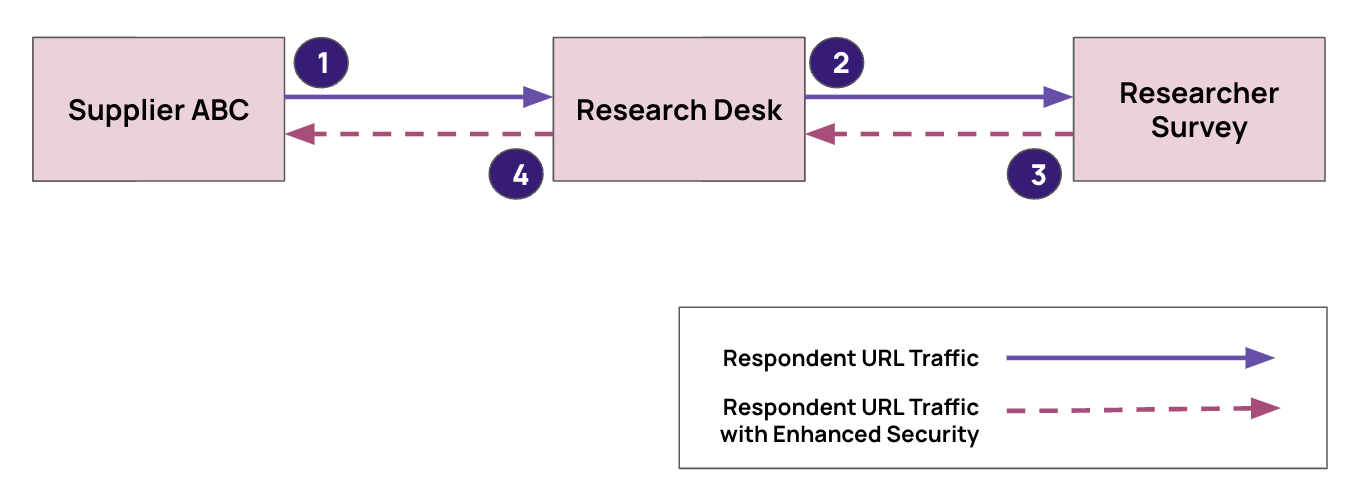
The scope of this page is limited to item 4 — respondent exit with a survey disposition from Research Desk to the supplier platform. Please contact supply@repdata.com with questions and support requests.
Encryption
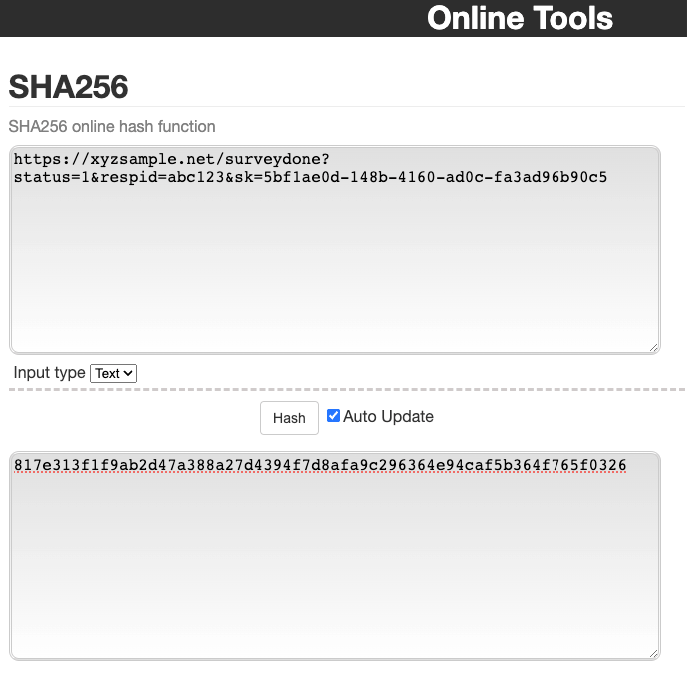
Research Desk uses a hashed key based on SHA-256 to return post-survey respondents back to suppliers with a survey disposition code (e.g. complete, term, OQ). The hashed key is based on the entire URL redirect combined with the supplier’s secret key. Your secret key is the same value as your Supply API key, available through Rep Data’s supplier registration process. SHA-256 hashed keys can be validated with this online tool: https://emn178.github.io/online-tools/sha256.html.Example
The example below uses a fictitious supplier, XYZ Sample, whose fictitious secret key is5bf1ae0d-148b-4160-ad0c-fa3ad96b90c5.
URL before encryption — the respondent “complete” (status=1) link, showing the underlying URL prior to encryption. This URL, including the supplier key, is never visible to the respondent:
- Respondent ID (
rid):abc123 - Supplier Secret Key (
sk):5bf1ae0d-148b-4160-ad0c-fa3ad96b90c5
- Respondent ID (
rid):abc123 - SHA-256 Hashed Key (
hk):817e313f1f9ab2d47a388a27d4394f7d8afa9c296364e94caf5b364f765f0326
Converting the URL
To convert the URL before encryption to the URL after encryption:- Use the entire link before encryption (including
httpsthrough the end of the supplier key value) as the input to SHA-256 encryption. - Replace the supplier key (
sk) in the link with the resulting SHA-256 hashed key (hk).