> ## Documentation Index
> Fetch the complete documentation index at: https://docs.repdata.com/llms.txt
> Use this file to discover all available pages before exploring further.
# Authentication Flow
> JWT signing, access token exchange, and security best practices for the SightX API.
Every call to the SightX API must include a valid access token in the `Authorization` header. Tokens are obtained by signing a JWT with your RSA private key and exchanging it at the authentication endpoint.
***
## Overview
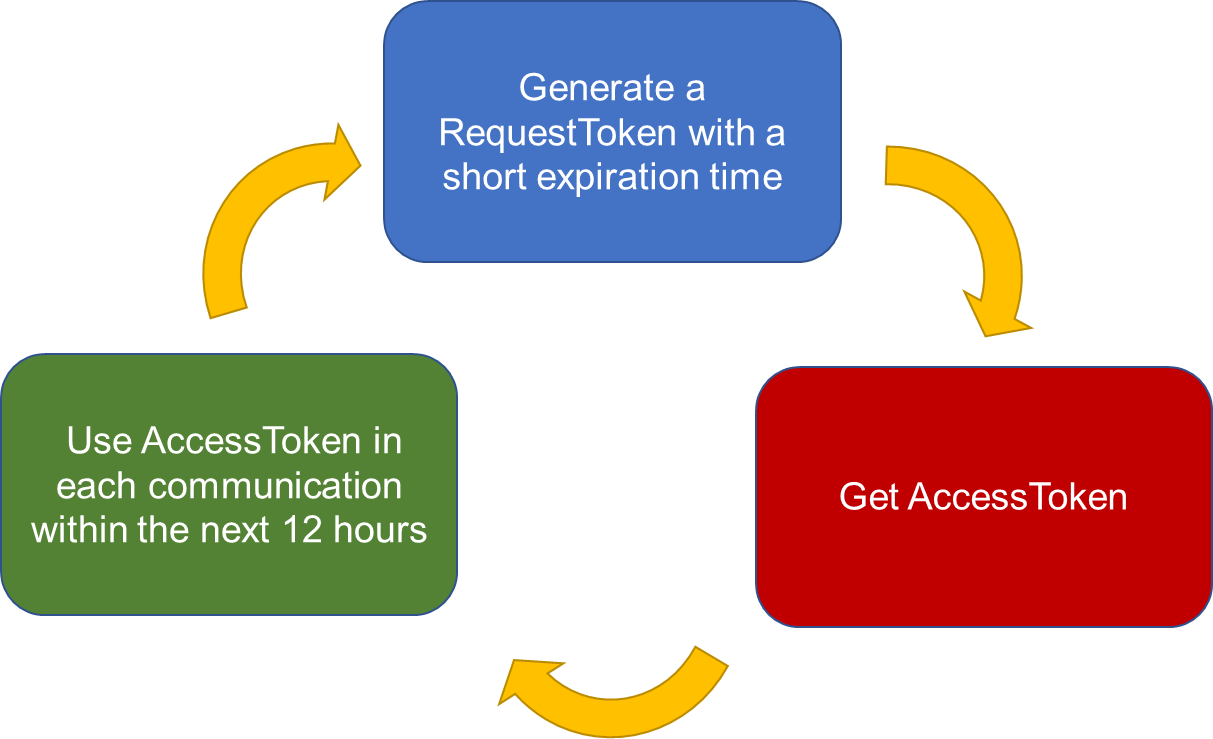
Access tokens last **12 hours**. Your integration should refresh tokens before they expire rather than re-authenticating on every call.
The authentication flow has two steps:
1. **Generate a signed JWT** using your client ID and RSA private key.
2. **Exchange the JWT** for an access token at the `m2m-token` endpoint.
## Recommended flow
 ***
## Step 1: Generate a signed JWT
### JWT contents
Each JWT has three parts: header, payload, and signature.
#### Header
| Claim | Value |
| ----- | ------- |
| `typ` | `JWT` |
| `alg` | `RS256` |
#### Payload
| Claim | Description |
| ----- | -------------------------------------------------------------- |
| `iss` | Your client ID (issuer) |
| `sub` | Your client ID (subject) |
| `aud` | Always `m2m-token` |
| `exp` | Expiration timestamp (30–300 seconds in the future) |
| `jti` | Optional unique token ID to prevent duplicate-request lockouts |
See [JWT Data](/sightx/guides/03-jwt-data) for claim details. For background on reserved claims, see [RFC 7519 §4.1](https://datatracker.ietf.org/doc/html/rfc7519#section-4.1).
#### Signature
```
RS256(base64encoded(Header) + '.' + base64encoded(Payload), MY_SHA256_PRIVATE_KEY)
```
See [Generate Keys](/sightx/guides/02-generate-keys) for RSA key pair instructions.
### Code examples
These snippets are examples only. Use libraries from [jwt.io/libraries](https://jwt.io/libraries) and your own key pair in production.
```javascript JavaScript theme={null}
const JSRSASIGN = require('jsrsasign');
const PRIVATE_KEY = `-----BEGIN RSA PRIVATE KEY-----
...
-----END RSA PRIVATE KEY-----`;
const oHeader = { typ: 'JWT', alg: 'RS256' };
const oPayload = {};
const tNow = JSRSASIGN.KJUR.jws.IntDate.get('now');
const tEnd = JSRSASIGN.KJUR.jws.IntDate.get('now + 1hour');
oPayload.iss = '';
oPayload.sub = '';
oPayload.aud = 'm2m-token';
oPayload.iat = tNow;
oPayload.exp = tEnd;
oPayload.jti = 'id123456';
const sJWT = JSRSASIGN.KJUR.jws.JWS.sign(
'RS256',
JSON.stringify(oHeader),
JSON.stringify(oPayload),
PRIVATE_KEY
);
```
```python Python theme={null}
from jose import jwt
token = jwt.encode(
{
"iss": "",
"sub": "",
"aud": "m2m-token",
"iat": 1634594281,
"exp": 1634597881,
"jti": "id123456",
},
PRIVATE_KEY,
algorithm="RS256",
headers={"alg": "RS256", "typ": "JWT"},
)
```
***
## Step 2: Exchange JWT for access token
POST your signed JWT to the authentication endpoint:
Exchange a signed JWT for a 12-hour access token.
Request body:
```json theme={null}
{
"jwt": ""
}
```
Successful response:
```json theme={null}
{
"accessToken": "..."
}
```
***
## Making authenticated requests
Pass the returned token directly in the `Authorization` header. No `Bearer` prefix is required.
```javascript JavaScript theme={null}
const response = await fetch('https://project.sightx.io/projects-api/v2/projects', {
method: 'GET',
headers: {
Authorization: accessToken,
'Content-Type': 'application/json',
},
});
```
```python Python theme={null}
import requests
response = requests.get(
'https://project.sightx.io/projects-api/v2/projects',
headers={
'Authorization': access_token,
'Content-Type': 'application/json',
},
)
```
***
## Security best practices
Treat your private key and client ID with the same care as a production secret. Anyone with access can request API tokens under your account.
### Key hygiene
* Generate a **dedicated key pair** for API access — do not reuse SSH keys from other systems
* Store your private key in a secrets manager (AWS Secrets Manager, HashiCorp Vault, Azure Key Vault)
* **Never commit private keys** to source control
### Token management
* Track token expiration — tokens are valid for **12 hours**
* Refresh proactively before expiry rather than waiting for 401 responses
* Use the optional `jti` claim to differentiate concurrent token requests and avoid duplicate-request lockouts
### Projects ownership
When a project is created via the API, its owner is the service account. Add members explicitly via the resources mappings endpoint if others need access.
***
## Next steps
Create your RSA key pair.
Required claim values and examples.
***
## Step 1: Generate a signed JWT
### JWT contents
Each JWT has three parts: header, payload, and signature.
#### Header
| Claim | Value |
| ----- | ------- |
| `typ` | `JWT` |
| `alg` | `RS256` |
#### Payload
| Claim | Description |
| ----- | -------------------------------------------------------------- |
| `iss` | Your client ID (issuer) |
| `sub` | Your client ID (subject) |
| `aud` | Always `m2m-token` |
| `exp` | Expiration timestamp (30–300 seconds in the future) |
| `jti` | Optional unique token ID to prevent duplicate-request lockouts |
See [JWT Data](/sightx/guides/03-jwt-data) for claim details. For background on reserved claims, see [RFC 7519 §4.1](https://datatracker.ietf.org/doc/html/rfc7519#section-4.1).
#### Signature
```
RS256(base64encoded(Header) + '.' + base64encoded(Payload), MY_SHA256_PRIVATE_KEY)
```
See [Generate Keys](/sightx/guides/02-generate-keys) for RSA key pair instructions.
### Code examples
These snippets are examples only. Use libraries from [jwt.io/libraries](https://jwt.io/libraries) and your own key pair in production.
```javascript JavaScript theme={null}
const JSRSASIGN = require('jsrsasign');
const PRIVATE_KEY = `-----BEGIN RSA PRIVATE KEY-----
...
-----END RSA PRIVATE KEY-----`;
const oHeader = { typ: 'JWT', alg: 'RS256' };
const oPayload = {};
const tNow = JSRSASIGN.KJUR.jws.IntDate.get('now');
const tEnd = JSRSASIGN.KJUR.jws.IntDate.get('now + 1hour');
oPayload.iss = '';
oPayload.sub = '';
oPayload.aud = 'm2m-token';
oPayload.iat = tNow;
oPayload.exp = tEnd;
oPayload.jti = 'id123456';
const sJWT = JSRSASIGN.KJUR.jws.JWS.sign(
'RS256',
JSON.stringify(oHeader),
JSON.stringify(oPayload),
PRIVATE_KEY
);
```
```python Python theme={null}
from jose import jwt
token = jwt.encode(
{
"iss": "",
"sub": "",
"aud": "m2m-token",
"iat": 1634594281,
"exp": 1634597881,
"jti": "id123456",
},
PRIVATE_KEY,
algorithm="RS256",
headers={"alg": "RS256", "typ": "JWT"},
)
```
***
## Step 2: Exchange JWT for access token
POST your signed JWT to the authentication endpoint:
Exchange a signed JWT for a 12-hour access token.
Request body:
```json theme={null}
{
"jwt": ""
}
```
Successful response:
```json theme={null}
{
"accessToken": "..."
}
```
***
## Making authenticated requests
Pass the returned token directly in the `Authorization` header. No `Bearer` prefix is required.
```javascript JavaScript theme={null}
const response = await fetch('https://project.sightx.io/projects-api/v2/projects', {
method: 'GET',
headers: {
Authorization: accessToken,
'Content-Type': 'application/json',
},
});
```
```python Python theme={null}
import requests
response = requests.get(
'https://project.sightx.io/projects-api/v2/projects',
headers={
'Authorization': access_token,
'Content-Type': 'application/json',
},
)
```
***
## Security best practices
Treat your private key and client ID with the same care as a production secret. Anyone with access can request API tokens under your account.
### Key hygiene
* Generate a **dedicated key pair** for API access — do not reuse SSH keys from other systems
* Store your private key in a secrets manager (AWS Secrets Manager, HashiCorp Vault, Azure Key Vault)
* **Never commit private keys** to source control
### Token management
* Track token expiration — tokens are valid for **12 hours**
* Refresh proactively before expiry rather than waiting for 401 responses
* Use the optional `jti` claim to differentiate concurrent token requests and avoid duplicate-request lockouts
### Projects ownership
When a project is created via the API, its owner is the service account. Add members explicitly via the resources mappings endpoint if others need access.
***
## Next steps
Create your RSA key pair.
Required claim values and examples.