> ## Documentation Index
> Fetch the complete documentation index at: https://docs.repdata.com/llms.txt
> Use this file to discover all available pages before exploring further.

# ReDem Credits

> What ReDem Credits are and how they are used.

## What are ReDem Credits?

ReDem Credits are the internal currency used to run quality checks on your survey data. Credits can be purchased as part of an annual subscription plan.

## Basics of ReDem Credits

Analyzing data with ReDem requires ReDem Credits, with the number of credits needed varying based on the **credit calculation method** and the **quality checks selected** for each respondent.

ReDem offers two credit calculation methods:

<CardGroup cols={2}>
  <Card title="All-inclusive" icon="infinity">
    Apply all possible quality checks\* to each interview for a **flat fee of 10 credits per interview**. This model offers predictable pricing and is best suited for teams seeking comprehensive quality assurance.
  </Card>

  <Card title="Modular Calculation" icon="sliders">
    <Note>Only applicable to licenses purchased before December 2025.</Note>
    The **minimum cost is 5 credits per respondent**, with additional credits required depending on the quality checks you select. This flexible approach enables you to balance costs while ensuring your desired level of data quality.
  </Card>
</CardGroup>

*\*Maximum data request: 100 CHS, 5 OES, 5 BAS, 20 GQS, and 100 TS. If additional data is required, modular credits will be calculated accordingly.*

## How credit calculation works in the modular calculation?

The following list provides a clear overview of how credits are calculated based on Quality Scores, with all calculations applied on a per-respondent basis:

<table>
  <thead>
    <tr>
      <th style={{border: '1px solid #e3e3e3', padding: '10px', textAlign: 'left'}} className="bg-gray-100 dark:bg-gray-800">Score Type</th>
      <th style={{border: '1px solid #e3e3e3', padding: '10px', textAlign: 'left'}} className="bg-gray-100 dark:bg-gray-800">Base Credits</th>
      <th style={{border: '1px solid #e3e3e3', padding: '10px', textAlign: 'left'}} className="bg-gray-100 dark:bg-gray-800">Additional Credits</th>
      <th style={{border: '1px solid #e3e3e3', padding: '10px', textAlign: 'left'}} className="bg-gray-100 dark:bg-gray-800">Maximum Credits</th>
    </tr>
  </thead>

  <tbody>
    <tr>
      <td style={{border: '1px solid #e3e3e3', padding: '10px'}}>Open-Ended-Score (OES)</td>
      <td style={{border: '1px solid #e3e3e3', padding: '10px'}}>3 (for the first question)</td>
      <td style={{border: '1px solid #e3e3e3', padding: '10px'}}>0.25 (for each additional question)</td>
      <td style={{border: '1px solid #e3e3e3', padding: '10px'}}>-</td>
    </tr>

    <tr>
      <td style={{border: '1px solid #e3e3e3', padding: '10px'}}>Time-Score (TS)</td>
      <td style={{border: '1px solid #e3e3e3', padding: '10px'}}>1</td>
      <td style={{border: '1px solid #e3e3e3', padding: '10px'}}>-</td>
      <td style={{border: '1px solid #e3e3e3', padding: '10px'}}>1</td>
    </tr>

    <tr>
      <td style={{border: '1px solid #e3e3e3', padding: '10px'}}>Coherence-Score (CHS)</td>
      <td style={{border: '1px solid #e3e3e3', padding: '10px'}}>4 (for the first 100 questions)</td>
      <td style={{border: '1px solid #e3e3e3', padding: '10px'}}>0.03 (for each additional question)</td>
      <td style={{border: '1px solid #e3e3e3', padding: '10px'}}>-</td>
    </tr>

    <tr>
      <td style={{border: '1px solid #e3e3e3', padding: '10px'}}>Grid-Question-Score (GQS)</td>
      <td style={{border: '1px solid #e3e3e3', padding: '10px'}}>0.05 per item</td>
      <td style={{border: '1px solid #e3e3e3', padding: '10px'}}>-</td>
      <td style={{border: '1px solid #e3e3e3', padding: '10px'}}>2</td>
    </tr>

    <tr>
      <td style={{border: '1px solid #e3e3e3', padding: '10px'}}>Behaviour-Analysis-Score (BAS)</td>
      <td style={{border: '1px solid #e3e3e3', padding: '10px'}}>2 (for the first data point)</td>
      <td style={{border: '1px solid #e3e3e3', padding: '10px'}}>0.25 (for each additional data point)</td>
      <td style={{border: '1px solid #e3e3e3', padding: '10px'}}>-</td>
    </tr>
  </tbody>
</table>

### 💡Important Credit Rules

* **Grid-Question Score (GQS):**
  * Each grid item costs 0.05 credits.
  * The total cost for GQS is capped at 2 credits per respondent, regardless of how many items are answered.

* **Time Score (TS):**
  * The maximum cost is 1 credit per respondent, regardless of the number of time-based data points analyzed.

* **Coherence Score (CHS):**
  * Covers up to 100 questions at a base cost of 4 credits per respondent.
  * For each additional question beyond 100, an extra 0.03 credits is charged.

* **Credits are only charged when a respondent’s processing is successfully completed. If processing fails for any reason, no credits are charged.**

* **Credits are applied only to valid and available data points.**

* **No credits are charged for blank or missing responses.**

* **Total Credit Calculation for Surveys**:
  * The total credit cost for a survey is the sum of credits used across all respondents.
  * Each respondent’s usage depends on their individual data and the quality checks applied.

<br />

### Sample Credit Calculation

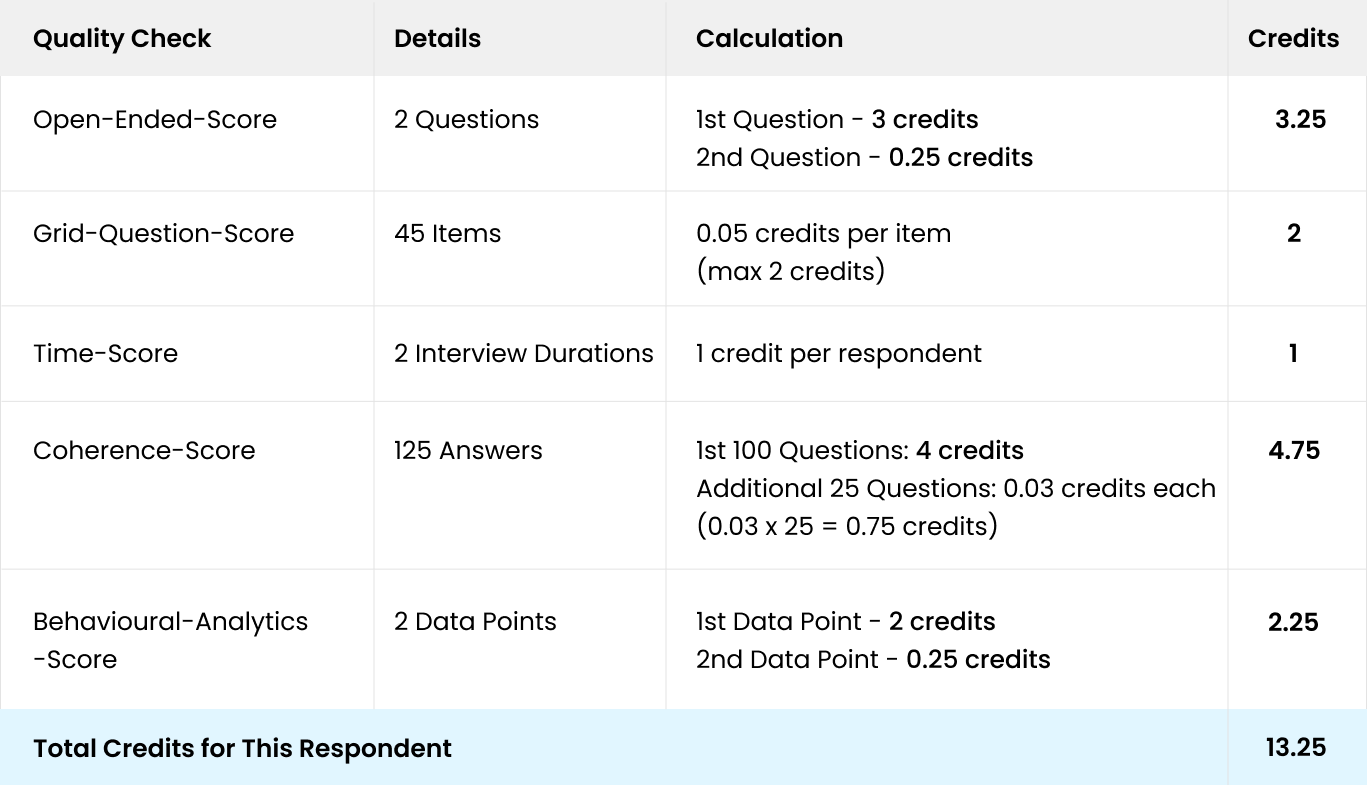
Here’s an example of how credits are calculated for an individual respondent:

<img classname="block dark:hidden" src="https://mintcdn.com/repdata/h9itcoqanyYKUFuk/redem/images/Credit-Calculation-Example.png?fit=max&auto=format&n=h9itcoqanyYKUFuk&q=85&s=3bf6c827e603391ae38a87e20c88eb52" width="1367" height="785" data-path="redem/images/Credit-Calculation-Example.png" />